Why Agustina Demands More Care Than Most Calligraphy Fonts
Choosing a calligraphy font for an invitation, a brand mark, or a product label often feels like an exercise in aesthetics alone. You scroll, you like what you see, and you move on. But with a font like Agustina—an elegant calligraphy style typeface built around a deliberately dancing baseline—the visual appeal is only the beginning. The real challenge lies in understanding what makes it work, where it fails, and how to avoid the missteps that turn a graceful design into a frustrating one.
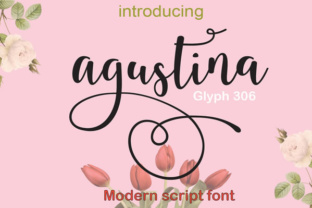
Agustina is not a neutral workhorse. It is a distinctive, expressive tool. It carries Initial Alternates, Terminal Alternates, Standard Ligatures, Stylistic Sets, and full support for Basic Latin (a–z, A–Z, numbers, and punctuation). Those features sound technical, but they translate directly into how flexible and forgiving the font actually is in real projects. Ignoring them—or treating Agustina like a simple script—is where most people go wrong.
The Mistake of Treating a Dancing Baseline Like a Static One
Most people who pick up Agustina for the first time expect it to behave like a neat, connected script. They place it in a design, kern it by eye, and wonder why the spacing looks uneven or why certain letter combinations seem to float apart. The answer lies in the baseline itself. Agustina was designed with what type designers call a dancing baseline—meaning the letters do not sit rigidly on a single horizontal line. They rise and fall slightly, mimicking natural hand-lettering flow.
This is precisely what gives Agustina its charm and its vulnerability. If you use standard word-processing software that forces a fixed baseline, you lose part of that rhythm. The letters may still look attractive individually, but the overall flow becomes stiff and disconnected. The better approach is to use software that respects OpenType features and allows the font to express its natural vertical variation. Adobe InDesign, Illustrator, Affinity Publisher, and even newer versions of Word with advanced typography enabled will give you far better results than a basic text editor.
What Happens When You Ignore the Alternates
Agustina includes Initial Alternates and Terminal Alternates. These are special letterforms designed to appear at the beginning or end of a word, creating a more natural entry and exit stroke. Many users never access them because they do not know they exist, or they assume the default glyphs are sufficient. This is a missed opportunity that directly affects how polished your finished piece looks.
For example, an initial alternate on a capital letter can give an invitation a sweeping, confident opening stroke. A terminal alternate on a lowercase final letter can add a graceful taper that feels handwritten. Without these, the same word may appear abrupt or mechanically repeated. The fix is simple: enable Stylistic Sets or use the OpenType panel in your design software to cycle through available alternates. Even using just one or two alternates per word can elevate the entire composition.
Overlooking the Standard Ligatures
Another common oversight involves Standard Ligatures. Agustina includes ligatures—combined letterforms that replace specific pairs like "fi," "fl," or "ff" with a single, smoother glyph. These are not just decorative; they solve spacing problems that occur when certain letter shapes collide. Without them, you can end up with awkward gaps or overlapping strokes that break the visual flow.
Some users turn off ligatures because they worry the font will look too ornate or because they do not understand what the ligature is doing. In Agustina, keeping ligatures enabled is almost always the right choice for body text and short phrases. The ligatures are designed to preserve the natural rhythm of the dancing baseline. If you disable them, you force the font to behave like a generic script, which undermines its purpose.
If you are working on a short headline or a single word and feel the ligature is too prominent, you can manually override that specific pair by selecting individual glyphs. But as a general rule, trust the ligatures. They were built into the font for a reason.
Underestimating the Stylistic Sets
Agustina’s Stylistic Sets are where the font reveals its true range. These sets allow you to swap entire groups of letters for alternate designs—sometimes more flourished, sometimes more restrained. Beginners often overlook this feature entirely, assuming the font has only the one look they see in the preview. That assumption limits creativity and leads to designs that look identical to thousands of others using the same font.
Experienced users, on the other hand, sometimes go too far. They activate every Stylistic Set at once, hoping for maximum variety, and end up with a word that looks disjointed because the alternates are competing with each other. The better strategy is to experiment with one set at a time, or to mix only two sets that share a similar level of ornamentation. For instance, pairing a restrained set for the main body of a word with a more decorative set for the initial letter can create a balanced, professional result.
A Practical Example: Choosing Alternates for an Invitation
Imagine you are designing a wedding invitation with the word "Celebrate" set in Agustina. The default version may look fine, but applying an Initial Alternate to the "C" gives it a sweeping entry. Adding a Terminal Alternate to the final "e" softens the ending. Enabling one Stylistic Set for the middle letters keeps the texture consistent. The result is a word that feels intentional and handcrafted, not typed. That is the difference between using Agustina and mastering it.
Mistakes When Pairing Agustina with Other Fonts
Agustina is a statement font. It demands attention and carries a strong personality. Pairing it with another script or with a display font that also has a dancing baseline usually creates visual noise. The reader does not know where to look, and the hierarchy collapses. This is one of the most frequent errors I see in branding and invitation design.
A more reliable approach is to pair Agustina with a clean, neutral sans-serif or a simple serif that stays out of the way. Fonts like Montserrat, Lato, or even a classic Garamond provide contrast without competing. The script does the expressive work, and the companion font provides structure for addresses, dates, or secondary information. Keep the Agustina for headlines, names, or short phrases. Let the supporting text breathe in a quieter typeface.
What to Check Before You Download or Buy
Before you commit to using Agustina in a project, there are a few practical checks worth making. First, confirm that the version you are buying or downloading includes the full set of OpenType features—Initial Alternates, Terminal Alternates, Standard Ligatures, and Stylistic Sets. Some foundries sell simplified versions of popular fonts that strip out these features. If you are getting Agustina from a marketplace, read the feature list carefully.
Second, test the font in the software you intend to use. Not every program handles OpenType features equally. A font that performs beautifully in Adobe Illustrator may behave differently in Canva, Google Docs, or Cricut Design Space. If you work primarily in a browser-based tool, check whether that tool supports Stylistic Sets and ligatures. If it does not, you may need to create your text in a more capable program and import it as a vector or image.
Third, preview your text at the actual size you will use. Agustina’s dancing baseline and alternates can look dramatically different at 12 points versus 72 points. What reads as graceful at display size may feel erratic at body size. Always proof at final scale before you commit to a layout.
Why Beginners Overestimate the Ease of Use
There is a widespread assumption that calligraphy fonts are plug-and-play. You install them, type your word, and the result looks like something a professional calligrapher spent hours on. Agustina can produce beautiful output quickly, but it still requires judgment. Spacing, alternates, and context all affect the final appearance. A beginner who types a long sentence in Agustina without adjusting anything will often end up with text that feels crowded and uneven.
The solution is not to avoid the font, but to adjust expectations. Agustina works best for short phrases—names, titles, taglines, or single words. For longer paragraphs, use it sparingly, at larger sizes, and with generous letter spacing. Treat it like a specialty tool, not a default text face. That shift in mindset alone will save you hours of frustration and produce results you are proud to share.
Efficiency Considerations for Professionals
If you are a freelancer, marketer, or small business owner creating multiple designs per week, efficiency matters. Spending extra time manually adjusting alternates and ligatures for every project may not be sustainable. One practical workaround is to create a set of saved text presets or templates in your design software. For example, save a preset for Agustina with your preferred Stylistic Set active and ligatures enabled. Then, when you start a new project, you only need to paste your text and make minor tweaks rather than rebuilding from scratch.
Another efficiency tip: limit yourself to two or three go-to alternate choices. You do not need to explore every glyph variant each time. Having a consistent approach—such as always using an Initial Alternate on the first letter and a Terminal Alternate on the last letter of a headline—gives you repeatable quality without decision fatigue.
The Real Value of Agustina in a Design Library
Agustina is not a font for every job, and that is precisely its strength. When used with intention, it brings a level of refinement that few scripts can match. The dancing baseline, the alternates, the ligatures, and the stylistic sets all work together to create something that feels organic and considered. The key is to respect what the font asks of you. It asks you to understand its features, to test it in your environment, and to use it where it shines.
If you take the time to learn those details, you will find Agustina becomes one of the most dependable tools in your collection. Not because it works everywhere, but because when it does work, it elevates everything around it.