El Zorro: Evaluating a Handwritten Font Built from Thin Pen Strokes
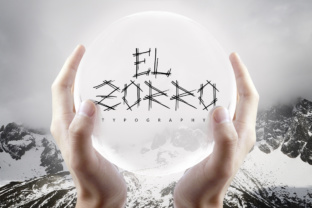
El Zorro (and its stylistic counterpart El Zorra) is a handwritten font that stands out for its distinctive construction: each letter is formed from multiple thin pen strokes. Rather than relying on a single continuous line, the font builds characters through layered, sketch-like marks that mimic natural handwriting with an expressive, almost calligraphic quality. For designers, typographers, and hobbyists evaluating display typefaces, El Zorro offers a unique texture that can either elevate a project or introduce challenges depending on the use case. This article provides a balanced look at what El Zorro is, why it might appeal to you, the practical tradeoffs involved, and how to decide if it fits your needs.
What Makes El Zorro Distinct?
El Zorro belongs to a niche category of handwritten fonts that emphasize process over polish. The glyphs are not smooth, looped scripts but instead appear as if drawn with a rapid, light-handed pen. Each letter is composed of multiple fine lines that overlap, cross, and separate, creating a sense of movement and spontaneity. The result is a typeface that feels genuine rather than reproduced, as though each character was individually sketched.
Importantly, El Zorra is often grouped with El Zorro as either a variation or a companion weight. While El Zorro may lean toward a slightly bolder or more structured stroke, El Zorra typically retains the same thin-line, multi-stroke DNA but with a lighter or more delicate execution. Both share the core aesthetic of fragmented, line-based letterforms that read more like a drawing than a traditional font.
This structural approach means El Zorro is not a legibility-first typeface. It prioritizes visual texture and artistic expression over clarity at small sizes. That has immediate implications for how and where it should be used.
Reasons You Might Be Interested in El Zorro
Several professional and creative scenarios naturally lead to considering a font like El Zorro. Understanding these motivations can help you evaluate whether it aligns with your project's goals.
- Authenticity and handcrafted feel: In an era of polished digital design, a font that looks genuinely hand-drawn adds a layer of human touch. El Zorro avoids the sterile uniformity of many script fonts by embracing irregular stroke patterns.
- Visual texture and depth: The multiple thin strokes create a subtle, airy texture that can make a design feel more dimensional. This works well for backgrounds, watermarks, or layered compositions.
- Artistic or experimental branding: For brands that want to convey creativity, individuality, or a hand-made ethos, El Zorro can serve as a distinctive signature element.
- Projects with short, large-scale text: Because the fine strokes can become difficult to read at small sizes, El Zorro is best suited for headlines, titles, logos, or single-word treatments where its detail can be appreciated.
Each of these points stems from the font's core trait: it is a display face designed to make a visual statement rather than to be a workhorse text font.
Benefits and Tradeoffs to Weigh
When evaluating El Zorro, it helps to separate its strengths from its limitations. The following table of considerations is not exhaustive but covers the most common factors designers encounter.
Benefits
- High visual personality: Very few fonts look like El Zorro. It can differentiate a project from competitors that use more conventional scripts.
- Flexibility in pairing: Its thin, open structure pairs well with bold sans-serif or serif body fonts. The contrast can create effective hierarchy in layouts.
- Emotional resonance: The hand-drawn quality can evoke nostalgia, craftsmanship, or artistic expression, depending on the context.
- Good for ornamental or decorative use: Individual letters or short words can function as graphic elements in their own right.
Tradeoffs
- Legibility drops rapidly at small point sizes: The fine strokes and open counters can make letters look incomplete or hard to distinguish below 14–16pt. At 10pt or 12pt, the font can become nearly unusable for body copy.
- Spacing irregularities: Because each glyph is built from multiple strokes, kerning pairs may be inconsistent. Manual spacing adjustments are often required to avoid collisions or excessive gaps.
- Not suitable for long reading sessions: The fragmented letterforms require more cognitive effort to decode. Readers may tire quickly when the font is used for paragraphs or extended text.
- Rendering issues on screens: On low-resolution displays or without proper hinting, the multiple thin strokes can alias, producing a jagged or muddy appearance. Test thoroughly on target devices.
The tradeoffs mean that El Zorro is not a universal choice. It solves a specific visual problem rather than serving as a general-purpose tool.
Where El Zorro Is a Strong Fit
Based on its characteristics, El Zorro performs best in situations where the text is brief, large, and visually prominent. Common strong-fit applications include:
- Invitations and stationery: Wedding invitations, greeting cards, or personal correspondence can benefit from the handcrafted feel. The thin strokes add elegance without being overly ornate.
- Logo and brand mark concepts: For boutique brands, artists, or creative professionals, El Zorro can serve as a distinctive logotype element. Its unique letter structures make it memorable.
- Quotes and hero text: Pull quotes, section headers, or hero banners in editorial design can use El Zorro to draw attention and set a tone.
- Packaging and product labels: Specialty food, artisanal goods, or handcrafted products often pair well with a font that communicates authenticity.
- Artistic and experimental projects: Posters, zines, or digital art where the font itself contributes to the visual narrative are natural homes for El Zorro.
In these contexts, the tradeoff of reduced legibility is acceptable because the text is short and the visual impact is the priority.
When Alternatives May Be Worth Considering
Not every project suits a multi-stroke handwritten font. You may want to look at other typefaces if any of the following apply:
- You need body text legibility: If the font must work at sizes below 14pt or for more than a few words, El Zorro will likely frustrate readers. Look for clean, legible scripts like Pacifico, Dancing Script, or Brush Script MT for better small-size performance.
- You require fast scanning: For UI elements, signage, or instructional text, readers need to identify words instantly. El Zorro's fragmented strokes slow recognition, making options like Raleway, Open Sans, or even a simpler handwritten font like Indie Flower more practical.
- You need extensive glyph support: Some handwritten fonts have limited character sets. Check whether El Zorro includes the accents, punctuation, or numerals your project demands. If not, a more complete script font may save time.
- You want a consistent reading experience: Multi-stroke fonts can produce uneven color (density) across a page. For documents where uniform texture matters, a single-stroke handwritten font or a calligraphy font with consistent stroke widths may be preferable.
- You are designing for print on uncoated paper: Very thin strokes can break up or fade when printed on rough, absorbent paper. Test a sample before committing to avoid disappointing results.
Alternatives do not have to be boring. Many handwritten fonts offer a balance of personality and readability that El Zorro deliberately sacrifices. The right choice depends on where you place the priority: pure expression or functional legibility.
Practical Decision-Making Insights
Choosing a font like El Zorro ultimately comes down to matching its strengths with your project's constraints. Here are a few guidelines to help you decide:
- Start with the text length and size. If your text is more than 10–15 words, or if you need to set it below 16pt, strongly consider using El Zorro only as a header accent and pairing it with a more readable secondary font.
- Test on real devices and paper. Because the multiple strokes can behave differently depending on rendering technology (screen, printer, or press), request a specimen or test the font in your actual production environment before purchasing or committing to a licensing agreement.
- Adjust letter spacing manually. Plan to spend time fine-tuning kerning pairs, especially for combinations like "AV", "To", or "Wa". Many designers find that increasing overall tracking (letter-spacing) by a small amount improves legibility without losing the hand-drawn character.
- Consider pairing with a clean, neutral font. To balance the visual busyness of El Zorro, use it sparingly and set body copy in a simple, unornamented sans-serif or serif. This lets the font act as an accent rather than overwhelming the layout.
- Evaluate the emotional tone carefully. El Zorro's sketch-like quality may not suit corporate, formal, or highly technical contexts. Reflect on whether your audience will interpret the handcrafted look as artistic or as unfinished.
By approaching El Zorro as a specialty tool rather than a default choice, you can leverage its unique properties without being surprised by its limitations.
Determining Whether El Zorro Aligns With Your Goals
To decide if El Zorro is right for you, ask yourself three questions:
- Does the text need to be read quickly and easily at small sizes? If yes, El Zorro is probably not the best fit. Look for a more conventional handwritten or script font.
- Is the visual texture of multiple thin strokes an essential part of the design concept? If the answer is yes, then El Zorro could be exactly what you need to achieve a specific look that other fonts cannot replicate.
- Am I willing to invest time in manual spacing and testing? Fonts with irregular stroke structures often require extra design work. If your timeline is tight, a more predictable font may be more practical.
El Zorro and El Zorra are not fonts for every project, but they are highly effective in the right niche. They reward careful, intentional use with a visual character that feels genuinely handcrafted. If you value texture, authenticity, and artistic expression over raw legibility, and if your project can accommodate these tradeoffs, then El Zorro deserves a place in your typeface library. For projects that demand clarity, speed, or extensive reading, however, you will likely find better results with a more purpose-built alternative. Evaluate with your specific context in mind, and let the project's requirements guide your choice.