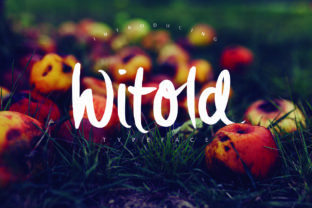
Witold: A Handbrushed Font That Fits Naturally Into Your Design Workflow
Choosing the right typeface is rarely a standalone decision. It sits at the intersection of tone, readability, brand identity, and technical compatibility. When you are building a visual system—whether for a website, a product label, a presentation deck, or a content library—the font you select shapes how your audience perceives every element around it. Witold, a handbrushed font family with super smooth rounded strokes, offers a balance that is harder to find than it sounds: warmth without sloppiness, character without distraction, and structure that still feels human.
Witold comes in three distinct variations that work together seamlessly: Witold Regular, Witold Bold, and Witold Light. Each weight carries the same DNA—smooth, rounded, brush-driven forms—but opens different doors in terms of hierarchy, emphasis, and atmosphere. Understanding how to place these variations into your actual workflow, rather than treating them as decorative afterthoughts, is where the real value lies.
Where Witold Belongs in the Process: From Planning to Polish
The most effective use of any type family comes when you integrate it early enough to influence decisions, but late enough that you understand the constraints of your medium. Witold fits comfortably across that entire arc. During the planning phase, the Light weight can serve as a low-contrast option for mood boards, wireframes, or early client presentations where you want to communicate a direction without committing to final visual weight. Its soft, rounded strokes keep the page approachable and reduce the cognitive friction that comes with harsh or overly formal typefaces.
As you move into execution, Witold Regular becomes the workhorse. It carries enough presence for headlines, subheads, and short-form body text without overwhelming the layout. The rounded brush strokes maintain a tactile quality that works especially well in digital environments, where screen rendering can flatten subtle details. Regular weight sits comfortably alongside both geometric sans-serifs and more ornate serifs, making it a practical bridge asset when you are combining multiple type families in a single project.
During the refinement and quality control stage, Witold Bold earns its place. Use it for call-to-action labels, pull quotes, or any element that needs to anchor the viewer’s attention without resorting to heavy graphic treatment. Because the Bold weight retains the same smooth, rounded structure as the other variations, it never feels aggressive. It simply adds gravity. This is particularly useful when you are reviewing a layout and realize you need a visual anchor that does not introduce a second typeface or require custom lettering.
How Witold Interacts With Other Design Assets and Tools
No font exists in a vacuum. Witold works well when paired with clean, minimal interface elements because the rounded brush strokes provide a human counterpoint to rigid UI components. In a typical project workflow, you might find it layered over muted background textures, placed alongside hand-drawn icons, or used in conjunction with photography that emphasizes natural light and organic shapes. The smoothness of the strokes means it does not compete with textured imagery; instead, it sits in the same tonal register.
From a tool compatibility standpoint, Witold handles predictably across major design applications. Whether you are setting type in Figma, Adobe Illustrator, Canva, or a web-based CMS, the three weights render consistently. The rounded strokes do not introduce unexpected artifacts at common display sizes, and the font maintains legibility down to around 14–16px for digital use, depending on the weight and screen density. This makes it a reliable choice for teams who need to move assets between platforms without rechecking every instance.
If you are working with variable typographic systems, Witold can function as a display or accent family while a simpler sans-serif handles body copy. For instance, a typical layout might pair Witold Bold for main section headers, Witold Regular for pull quotes, and a neutral sans-serif like Inter or Open Sans for paragraphs. This kind of layered approach leverages the font’s personality where it has the most impact, while keeping long-form reading comfortable.
Practical Implementation Tips for Different Use Cases
One of the strengths of Witold is that each variation solves a different practical problem, and you can deploy them without redesigning your entire system.
Branding and Identity Projects
If you are developing a brand identity for a small business, a creative studio, or a product line, start with Witold Regular as the primary logotype candidate. Its smooth rounded strokes convey approachability and craft, which is ideal for brands that want to emphasize handmade quality or personal service. Use Witold Light for secondary messaging like taglines or supporting text, and reserve Witold Bold for digital assets such as social media graphics or email headers where visual hierarchy matters more than character count.
When presenting brand concepts to clients, show the full family together early. Because the three weights harmonize naturally, clients can see how the system scales from a packaging label to a website banner without losing coherence. This reduces the number of revision cycles later in the project.
Content and Marketing Workflows
For bloggers, marketers, and content creators, Witold can serve as a consistent accent across multiple media types. Use Witold Regular for blog post titles and section headings, then switch to Witold Bold for featured callout boxes or email subject line preview text. The Light weight works well for secondary navigation labels or subtle footer elements where you want the brand voice to remain present without dominating the page.
If you manage a content library or a social media schedule, consider creating a reusable style guide entry for Witold that specifies exact sizes, line heights, and spacing for each weight. This eliminates guesswork when multiple team members are producing assets, and it ensures that a post’s typographic voice stays consistent from a LinkedIn graphic to a landing page hero.
Learning and Educational Materials
Educators, course creators, and instructional designers often need fonts that feel engaging without being distracting. Witold Light is particularly useful for slide decks, handout headers, or online course module titles because its soft strokes reduce visual noise. Pair it with a clean body font for the core content, and use Witold Bold sparingly for key terms or action items. The rounded structure helps maintain a friendly tone, which can make a difference in learner engagement over a long course sequence.
Efficiency and Consistency Across Projects
Once you integrate Witold into your workflow, the main efficiency gain comes from the fact that you are working with a family rather than a single style. Instead of searching for a complementary display font for every new project, you already have a hierarchy built in. This is especially useful for freelancers and small business owners who produce a high volume of assets with limited time.
For consistency, create a simple typographic token system: define Witold Light for secondary headings, Witold Regular for primary headings, and Witold Bold for emphasis or high-level navigation. Store these tokens in your design system or CMS settings so that every new page, post, or product listing automatically applies the correct weight. Over months of use, this discipline prevents the gradual drift that happens when you manually adjust font styles project by project.
Quality control becomes easier as well. Because the three weights share the same stroke logic and rounded character, you can check an entire layout at once. If a heading in Witold Bold looks out of place, the issue is likely related to spacing or size rather than a fundamental mismatch between weights. This reduces the number of micro-adjustments you need to make during the final review phase.
Long-Term Use and Adaptability
A font family that works well across different project types and time frames is one that does not force you into a specific aesthetic corner. Witold’s handbrushed quality is distinctive enough to define a visual voice, but the smooth rounding keeps it from feeling too niche. Over the course of a year, you might use it for a workshop workbook, a product launch landing page, a set of social templates, and a printed brochure. Each application will look different, yet the typography will carry a consistent thread.
If your work involves iterating on existing designs, Witold Light is worth testing as a refresh option. Replacing a heavier display font with Witold Light can soften a layout that feels too dense, without requiring a full redesign. Similarly, Witold Bold can modernize a design that currently relies on thin, fragile letterforms. Small shifts like these keep your visual output evolving without starting from zero every time.
Observations on Preparation and Workflow Integration
Before you begin a new project that will use Witold, take ten minutes to set up your environment. Load all three weights into your design tool of choice, create a sample page with each weight at several sizes, and note how they behave on your primary output medium. For digital work, check how the font renders at smaller sizes on different browsers or operating systems. For print, test a few lines at actual output size to confirm that the rounded strokes retain their smoothness.
If you are collaborating with other designers or developers, share a brief usage guide that specifies which weight to use in which context. Even a few bullet points can prevent misapplication later. For example, you might note that Witold Regular is recommended for header text above 24px, while Witold Light works best for decorative subheaders between 18px and 36px.
When you are deciding between weights for a specific element, consider the distance your audience will be from the screen or page. Witold Light reads well at close distances and larger sizes, while Witold Bold maintains legibility at a distance or smaller scale. This is a simple but practical heuristic that works across posters, slides, mobile screens, and packaging.
Finally, think about how Witold will age within your own library. The font’s handbrushed, rounded character has a natural, approachable quality that tends to resist trend cycles because it is rooted in a traditional craft aesthetic rather than a specific seasonal style. If you build a consistent system around it now, you are likely to find it still fits your workflow several years down the line, across new projects and evolving mediums.