AZ Grampa: Integrating a Vintage Typewriter Font into Your Creative Process
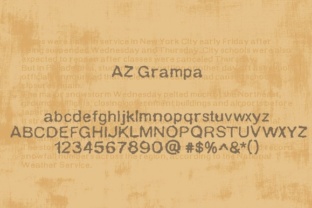
Typography choices can define a project’s tone before a single image or word is absorbed. For creators who want warmth, authenticity, and a tactile, analog feel, a font like AZ Grampa offers a distinct solution. Its design mimics the irregular, ink-stamped look of old typewriters—slightly uneven, textured, and full of character. Unlike polished digital fonts, AZ Grampa brings a human, hand-pressed quality that works well for storytelling, branding, and content that aims to feel immediate and real.
This article explores where AZ Grampa fits into practical workflows, how to plan for its use, and how to integrate it smoothly into both short-term projects and long-term creative systems.
What AZ Grampa Brings to a Design Workflow
At its core, AZ Grampa is a vintage-style typewriter font. Its characters show the small imperfections that come from mechanical type—variations in ink density, subtle misalignments, and a slightly worn appearance. This makes it more than a stylistic choice; it is a functional tool for conveying nostalgia, sincerity, or a handmade aesthetic.
For anyone involved in content creation—bloggers, small business owners, marketers, or educators—AZ Grampa serves as a way to break away from sterile, uniform typography. It pairs effectively with minimalist layouts, hand-drawn elements, and muted color palettes. Designers often use it when they want a headline or short block of text to feel like it was written recently, but with the soul of a bygone era.
From a process perspective, AZ Grampa is a specialty tool. It works best when you understand its limitations: low legibility at very small sizes, a strong personality that can overwhelm complex designs, and a need for careful spacing. Acknowledging these early helps you plan integrations before you start laying out a project.
Planning for AZ Grampa: Before You Open Your Project
Preparation determines whether a font like AZ Grampa feels intentional or disruptive. Start by identifying the emotional and tonal goals of your project. If you are creating a brand identity for a coffee shop, a handmade soap line, or a personal blog with a storytelling voice, AZ Grampa can anchor that identity. For corporate reports, technical documentation, or data-heavy presentations, it is rarely the best choice.
Consider your audience. Younger audiences may read AZ Grampa as retro or ironic; older audiences may see it as familiar and trustworthy. Both responses can be useful, but they require different supporting elements. For example, pairing AZ Grampa with clean sans-serif fonts for body copy helps balance its vintage voice with modern readability.
Check compatibility early. Whether you use Adobe Creative Suite, Canva, Affinity, or web design tools like Webflow or Squarespace, make sure AZ Grampa renders correctly. Test it on screen and in print. Some design platforms may substitute a generic serif if the font is not properly loaded. For websites, use web font services or self-host the font with proper CSS declarations to ensure consistent display across browsers.
Prepare your asset library. Collect textures, backgrounds (like parchment, aged paper, or linen), and photos that share the same era-feel as AZ Grampa. This alignment reduces the need to force match elements later and makes integration feel seamless.
Using AZ Grampa During the Creative Process
Once you begin a project, AZ Grampa should be placed with intention. It works extremely well in short lines: headlines, pull quotes, labels, badges, or navigation elements. Because its letters carry visual weight, avoid using it for long paragraphs. A sentence or two at 18–24pt often feels punchy and readable. For smaller text, reserve it for decorative accents or captions where legibility is less critical.
Pairing matters. A common workflow is to use AZ Grampa for headings and a neutral sans-serif like Helvetica, Open Sans, or Montserrat for body text. This contrast gives the vintage font room to breathe and prevents reader fatigue. Another approach is to combine AZ Grampa with a clean, modern slab serif. The combination adds texture without looking dated.
Color choices affect how the font reads. AZ Grampa looks best on off-white, cream, or textured backgrounds. Black or dark gray ink on a muted background mimics the tactile feel of paper and ink. For digital use, consider adding a slight noise or grunge overlay to the design to reinforce the analog aesthetic.
Spacing is critical. AZ Grampa benefits from loose letter spacing (tracking) in headlines and tighter tracking in smaller text. Adjust line height so characters do not collide, especially on screens with low resolution. Test your layout on multiple devices if you are designing for the web.
Quality Control and Long-Term Use of AZ Grampa
After the design is placed, review consistency. If you use AZ Grampa across a set of materials—business cards, website headers, social media templates, and product packaging—check that each piece aligns with the same expression of the font. Variation in weight, size, or spacing can break the visual system.
For long-term projects, consider how AZ Grampa will age. A vintage font used on a blog or brand that lasts five years may feel cliché if overused. Keep it for specific touchpoints: hero text, signature elements, or promotional campaigns. Rotate other vintage-inspired fonts or pair it with fresh imagery to maintain interest without overhauling your entire identity.
Licensing is another practical consideration. Some font families have restricted use in commercial products, web embedding, or mobile apps. Confirm that your license for AZ Grampa covers all the contexts where you intend to use it. This step protects you from legal issues and ensures your workflow is sustainable.
If you work in a team, document your typography guidelines. Include AZ Grampa along with its approved sizes, colors, pairings, and use cases. This reduces inconsistency when multiple people work on the same brand assets.
Practical Use Cases for Different Audiences
AZ Grampa fits naturally into workflows for several types of creators.
Bloggers and content creators can use AZ Grampa for post titles, author bylines, or sidebar elements like quote cards. A personal finance or lifestyle blog can use it to build a trustworthy, conversational tone. It works well for showing date stamps or letters within narrative posts.
Small business owners and marketers can apply AZ Grampa to product labels, signage, or promotional flyers. A local bakery, bookstore, or craft goods seller benefits from the font’s handcrafted feel. It also works for limited-edition packaging or event posters where you want a sense of occasion.
Educators and course creators might use AZ Grampa for printable worksheets, workshop handouts, or slide titles when the subject has a historical or literary angle. For online courses, it can define the visual theme of a module focused on storytelling, journalism, or history.
Publishers and freelancers working on books, zines, or newsletters can use AZ Grampa for chapter headings, mastheads, or pull quotes. It helps the printed page feel intentional and crafted rather than templated. In digital newsletters, use it sparingly—perhaps for the subject line header or a signature block—to draw attention without overwhelming the content.
Efficiency and Workflow Integration Tips
To integrate AZ Grampa smoothly into your routine, build templates that use it. In Canva or Adobe InDesign, save a template with AZ Grampa as the heading font, paired with your body font of choice, along with pre-set colors and spacing. This lets you reuse your best setup without rebuilding it each time.
If you manage multiple projects, organize your font library into folders. Keep AZ Grampa alongside other decorative or vintage fonts, and separate them from utilitarian fonts you use for body text. This reduces browsing time when you start a new task.
For those who work with WordPress or other content management systems, create CSS styles that apply AZ Grampa to specific elements—like post titles or blockquotes—rather than to the entire site. This approach balances visual interest with performance and accessibility.
Finally, test your designs with real users. If you use AZ Grampa on a landing page or product packaging, ask a few people outside your team whether the font feels appropriate and readable. Their feedback can change how you apply the font in future projects.
In summary, AZ Grampa is not a font for every situation. It is a deliberate choice for projects that want to communicate history, warmth, and individuality. By planning its use, pairing it carefully, and testing across mediums, you can incorporate it into your workflow without sacrificing legibility or consistency. For anyone looking to add a genuine vintage texture to their work, AZ Grampa provides a reliable and expressive starting point.