A Tale of Two Pumpkins: Mastering the All Caps Font with Dual Personalities
What Makes Pumpkin a Typographic Anomaly
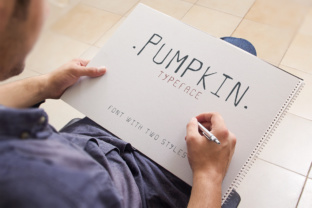
Most typefaces follow a predictable pattern: uppercase keys produce uppercase glyphs, and lowercase keys produce lowercase glyphs. PUMPKIN — also referred to in some foundries as PUMKIN — breaks this convention entirely. It is an all caps font in the truest sense, but what sets it apart is that every single glyph, whether typed with Caps Lock on or off, renders as a capital letter. However, the two cases do not produce the same capital. Instead, they unlock two distinct stylistic variants of each character. This means that when you type a lowercase "a," you get one version of the capital A, and when you type an uppercase "A," you get a second, visually different capital A. The result is a typeface that behaves like a single font but contains the versatility of two complete alphabets.
This design philosophy challenges the conventional relationship between keyboard input and typographic output. Designers who work with PUMPKIN quickly discover that they are not simply choosing a font; they are engaging with a system that rewards intentional keystroke planning. The lowercase set often carries a more playful, rounded, or ornamental quality, while the uppercase set tends toward bold, authoritative, or geometric forms. The exact aesthetic contrast depends on the specific cut of the font you are using, but the underlying principle remains consistent: PUMPKIN gives you two visual voices without requiring you to switch typefaces or toggle stylistic sets in a dropdown menu.
Where the Two Styles Diverge — and Why That Matters
Understanding the practical gap between the lower-case and upper-case letterforms in PUMPKIN is essential for anyone who plans to use it seriously. In many implementations of this font, the lowercase keystrokes produce glyphs that feel warmer, more approachable, and sometimes even hand-drawn. These characters might feature softer curves, slightly irregular stroke widths, or decorative flourishes that evoke a sense of craftsmanship. The uppercase keystrokes, by contrast, often render glyphs that are rigid, symmetrical, and monumental — the kind of lettering you might expect to see carved into stone or stamped onto industrial equipment.
Take the letter "E" as an example. The lowercase-keystroke version might have a curved tail or a slight slant, while the uppercase-keystroke version could be perfectly orthogonal with sharp terminals. This duality means that a single word set entirely in PUMPKIN can shift in tone from line to line, or even from letter to letter, depending on how the designer toggles the Shift key. For logo work, this is invaluable. You can spell a brand name using all uppercase keystrokes for a commanding presence, then switch to lowercase keystrokes for a submark or tagline that feels more human without ever leaving the same font family.
The PUMKIN variant — sometimes listed as a separate weight or a simplified version — tends to strip back some of the more ornate details while retaining the core dual-style mechanic. If the full PUMPKIN font is the ornate, expressive option, PUMKIN is the streamlined, workhorse version built for body copy at larger sizes or for applications where legibility must remain high even as the stylistic switch operates in the background.
Real-World Use Cases That Exploit the Dual-Style Mechanism
Designers have found remarkably creative applications for PUMPKIN across multiple disciplines. One of the most compelling use cases is in editorial design, where pull quotes or chapter headings can subtly alternate between the two styles to create rhythm without resorting to a second typeface. A magazine spread might use uppercase-keystroke PUMPKIN for the headline and lowercase-keystroke PUMPKIN for the deck or subhead, establishing a clear hierarchy through glyph shape alone.
In branding and identity work, the font offers a built-in adaptability that many designers find irresistible. A single logotype can express stability and tradition when set in the uppercase-keystroke style, then shift to innovation or friendliness when the lowercase-keystroke style is used for secondary applications. Some agencies have even built entire brand systems around this duality, using the uppercase style for formal communications and the lowercase style for social media or packaging. The cost savings are real: one font license does the work of two.
Packaging design benefits enormously from the two-style system. A product name can be set in the bold, uppercase-keystroke variant to grab attention on a crowded shelf, while ingredient lists or descriptive copy on the back of the package uses the lowercase-keystroke variant to convey approachability and care. Because both styles share the same underlying skeleton, they harmonize visually even when they contrast in personality. This coherence is difficult to achieve when mixing two separate fonts.
Another surprising application is in wayfinding and environmental graphics. Museum labels, exhibition titles, and directional signage often need to balance authority with approachability. PUMPKIN allows a single signage system to deliver both. A gallery name might appear in the uppercase-keystroke style, while directional arrows and room numbers use the lowercase-keystroke style, creating a unified but differentiated visual language that guides visitors intuitively.
Who Should Reach for Pumpkin — and Who Might Think Twice
PUMPKIN is not a font for every project, but it is an excellent fit for a wide range of professionals. Graphic designers and art directors who work on branding, editorial, or packaging projects will find the dual-style system immediately useful. It gives them a way to introduce contrast without adding complexity to their font stack. Typography educators and researchers will appreciate how the font challenges students to think about the relationship between keyboard input and visual output — a conceptual lesson that extends well beyond the specifics of this typeface.
Hobbyists and small business owners who handle their own design work will find PUMPKIN forgiving and fun. Because both styles are all caps, there is no risk of accidentally mixing case in a way that looks unprofessional. The worst that happens is that you create an unintended alternation between the two styles, which, in many contexts, reads as intentional texture rather than error. For anyone who lacks formal typography training but needs to produce polished materials, this safety net is valuable.
However, there are situations where PUMPKIN may not be the best choice. Long-form body copy at small sizes can become visually exhausting if the two styles alternate unpredictably. The all caps nature of the font already reduces readability compared to lowercase text, and adding stylistic variation compounds that challenge. Accessibility specialists should also take note: readers with dyslexia or other reading difficulties often struggle with all caps text, and the additional glyph variation in PUMPKIN may further impede comprehension. For these scenarios, reserve the font for display sizes or short, high-impact phrases.
Technical Nuances and Implementation Considerations
Installing and using PUMPKIN is straightforward, but there are a few technical details that can trip up even experienced users. Because the font relies on the keyboard case to determine which style appears, you must ensure that your software does not override your case input. Some word processors and design applications automatically correct the first letter of a sentence to uppercase, which can disrupt a carefully planned alternation pattern. In Adobe InDesign or Illustrator, turning off "Auto-Open" or "Auto-Correct" features is advisable when working with this typeface.
Another consideration is font versioning. You may encounter PUMPKIN from one foundry and PUMKIN from another, and the two may not be interchangeable. The glyph ranges, weight options, and even the specific aesthetic of the lowercase versus uppercase styles can differ. Always test the exact font file you plan to use before committing to a project. Some versions include additional OpenType features such as ligatures or alternate glyphs that can further expand your design palette, but these features are not guaranteed across all cuts of the font.
Kerning and spacing deserve special attention. Because the two styles can have dramatically different proportions, a word set entirely in uppercase-keystroke glyphs may look tightly kerned while the same word in lowercase-keystroke glyphs appears loose. Manual kerning adjustments may be necessary, especially in logo work or short headlines where every pixel counts. Many professional versions of PUMPKIN include kerning pairs that account for cross-style combinations, but do not rely on this — always preview your text at actual size.
Observations from the Design Community
Experienced users of PUMPKIN often develop personal workflows for managing the two styles. A common technique is to type all text in lowercase first to establish the "soft" style, then selectively shift specific letters or words to uppercase to add emphasis. This creates a visual hierarchy that feels organic rather than mechanical. Others prefer to use the uppercase-keystroke style for nouns and the lowercase-keystroke style for verbs or adjectives, effectively building a grammatical dimension into their typography.
One designer interviewed for this article described using PUMPKIN to create a wedding invitation suite. The couple's names appeared in the uppercase-keystroke style to convey formality, while the event details — date, time, location — were set in the lowercase-keystroke style to feel warm and personal. The entire suite used exactly one font, yet the visual range was remarkable. Another designer used PUMKIN for a craft brewery's label system, switching between the two styles to differentiate beer names from style descriptors without adding a second typeface.
The font has also found a niche in experimental typography and digital art, where the dual-style mechanic becomes part of the conceptual message. Artists have created pieces where the alternation between the two styles mirrors themes of duality, identity, or transformation. In these contexts, PUMPKIN is not just a tool but a medium in itself, with the keyboard case serving as a creative constraint that drives the work forward.
Comparing Pumpkin to Other Dual-Style Typefaces
PUMPKIN is not the only font that offers stylistic variation through keyboard case input, but it is one of the most deliberate in its execution. Some typefaces offer "case-sensitive" alternates that modify punctuation or glyphs when Caps Lock is active, but these are typically subtle. PUMPKIN goes much further, offering a complete second alphabet that is visually distinct from the first. This places it in a small category that includes fonts like Bulletin Typewriter or certain display faces from independent foundries, but few achieve the same level of contrast while maintaining such cohesive overall proportions.
What truly distinguishes PUMPKIN — and by extension PUMKIN — is the intentionality baked into its design. The two styles are not arbitrary; they are crafted to complement each other, giving designers a genuine choice rather than a technical gimmick. This is why the font has persisted in design circles long after trendier options have faded. It solves a real problem: how to create contrast within a single typeface without sacrificing visual unity.
Making the Most of the Dual-Style Workflow
To get the best results from PUMPKIN, treat the keyboard case as a design tool rather than an input afterthought. Before you start setting type, decide on the role each style will play in your composition. Will the uppercase-keystroke style carry primary information and the lowercase-keystroke style carry secondary information? Or will you alternate them for purely aesthetic reasons? Establishing this logic early prevents inconsistency and gives your work a coherent rationale.
Experimentation is also encouraged. Because the font is all caps, you cannot accidentally produce a grammatical error by mixing cases — every letter is a capital, regardless of whether you hold Shift. This freedom allows you to try combinations that would look chaotic in a traditional font but feel deliberate in PUMPKIN. Try setting a single word with alternating case letters to see how the visual texture changes. You may discover patterns that become signature elements of your design style.
Finally, remember that PUMPKIN and PUMKIN are tools with distinct personalities. The ornate nature of PUMPKIN suits display work, decorative headlines, and projects where typography is the primary visual element. The streamlined PUMKIN variant is better suited for applications where the font must carry more information without overwhelming the layout. Choosing between them is not a matter of quality but of fit, and the best designers keep both in their toolkit for different occasions.