Toscana
If you’ve been browsing display fonts for invitations, branding, or social media graphics, you’ve likely come across Toscana. It’s one of those typefaces that catches your eye immediately: elegant, handcrafted, with an old-world calligraphy feel. But before you download or purchase it, there’s more you should know. Many people pick a font based on looks alone and later realize it doesn’t work the way they expected. This article walks you through the most common mistakes people make with Toscana, and how to avoid them so you can get the best results for your project.
What Is Toscana and Why It Stands Out
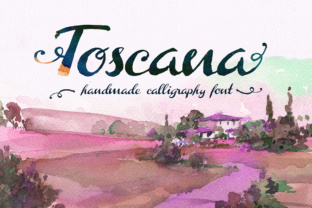
Toscana is a complete handmade calligraphy style font. It includes both uppercase and lowercase letters, plus additional alternate decorative terminal glyphs that give endings a graceful flourish. The font family comes with two main files: Toscana Regular and Toscana Ornaments. The ornaments are small decorative elements like swashes and flourishes that you can place around letters or use on their own. This combination makes Toscana especially attractive for wedding stationery, certificates, logos, and any project where you want a refined, human touch.
Because it’s entirely hand-drawn, each character has slight organic variations. That means it looks warm and authentic, not mechanically perfect. Many designers appreciate this quality, but it also introduces constraints. If you treat Toscana like a standard sans-serif or a clean script, you might end up frustrated. Understanding its strengths and weaknesses from the start saves time and helps you use it with confidence.
Mistake 1: Choosing Toscana Purely for Its Aesthetic
The biggest pitfall is selecting Toscana because you love how it looks in a font preview, without considering how it will behave in your actual project. A font preview shows a few letters in a neat line. It doesn’t show you how words stack, how the descenders interact with line spacing, or how the ornaments attach to different letters. I’ve seen people use Toscana for a blog headline only to find that the lowercase “g” or “y” dips into the text below, making it unreadable.
Better approach: Always test Toscana with real content. Type a full sentence, a paragraph, and a title at the size you plan to use. Check the spacing between letters (kerning) and lines (leading). Many calligraphy fonts need extra line spacing because of flourishes. If your design software allows it, also test the alternate terminal glyphs. Some applications let you access them via the Glyphs panel. Don’t assume the default letters will always look best; sometimes swapping to a terminal variant improves the overall flow.
Mistake 2: Overlooking Readability for the Sake of Style
Calligraphy fonts by nature can be harder to read than simpler typefaces. Toscana is no exception. Its strokes are thick and thin, and the uppercase letters have ornate details. When used for large amounts of body text, it quickly becomes tiring on the eyes. I’ve seen entrepreneurs try to use Toscana as the main font for an entire website or product label. The result is beautiful in small doses, but users click away because they can’t quickly scan the information.
What to do instead: Reserve Toscana for headings, subheadings, short quotes, or decorative elements. Pair it with a clean, readable sans-serif like Open Sans, Lato, or Montserrat for body text. The contrast between a handwritten style and a neutral sans-serif creates visual interest without sacrificing legibility. If you’re creating a print piece like a wedding invitation, use Toscana for the couple’s names and a simple serif or script for the details. This balance keeps the design elegant and functional.
Mistake 3: Ignoring the Ornaments and Alternate Glyphs
Toscana comes with ornaments, but many users never explore them. They treat the font as a single style and miss out on the decorative potential. On the other hand, some people overuse ornaments and clutter their design. Adding a swash after every word or placing an ornament in every empty corner looks messy, not refined.
Better use: Study how calligraphers use flourishes in real hand-lettering. A flourish should complement the letterforms, not compete with them. When you insert a Toscana ornament, place it at the end of a line or as a standalone accent for capitals. Less is more. The alternate terminal glyphs are especially useful for giving the last letter of a word a graceful extension. For example, if you write “Love” using the default letters, the “e” might end abruptly. By activating the alternate terminal ‘e’, you get a slight curl that ties the word together. These subtleties are what make the font feel professional.
To access these features, you need software that supports OpenType features, like Adobe Illustrator, InDesign, or Affinity Publisher. Many free tools like Canva or word processors may not show all glyphs. If you are a small business owner working mainly in Canva, check whether the version you’re using supports ligatures and stylistic alternates. If not, you may need to use a program like Photoshop Elements or a dedicated font viewer to copy and paste the special characters.
Mistake 4: Misunderstanding Licensing and Usage Rights
Font licensing is a common area of confusion. Toscana may be sold by various foundries under different licenses. Some licenses cover only personal use, others include commercial use for up to a certain number of sales or impressions. I’ve seen bloggers download a “free for personal use” version and then use it on a website that runs ads or sells products, which violates the license. This can lead to legal notices or having to redesign your brand later.
Practical advice: Before downloading or buying, read the licensing terms carefully. Look for details about web embedding, logo usage, and revenue limits. If you’re a freelancer or agency, make sure you have a license that covers client work. Some vendors offer extended licenses for merchandise or large-scale reproduction. Keep a copy of your license receipt. If you’re unsure, contact the seller. It’s better to pay for the correct license than to risk using it improperly. Toscana is an investment, but one-time purchases often include future updates.
Mistake 5: Using Toscana Without Considering the Medium
Fonts behave differently on screen versus print. Toscana, being a handmade font, has fine details and thin strokes. On a screen, especially at small sizes or low resolution, those thin lines can disappear or look jagged. I’ve seen digital invitations where the names were unreadable because Toscana was used at 16px with no anti-aliasing. Similarly, printing on uncoated paper may cause the ink to spread and fill in the thin parts of the letters, making them look heavy.
Better approach: Test Toscana at the actual size and medium you intend to use. For digital use, increase the font size slightly and consider adding a light stroke weight or shadow to keep legibility. For print, request a proof or test print on your chosen paper. If the paper is textured or absorbent, you may want to use a slightly larger size or a heavier weight (if available). Toscana Regular is the main weight, so plan accordingly. The ornaments, being delicate, are best used at larger sizes or for accent purposes only.
What to Check Before You Commit to Toscana
Before you make Toscana part of your brand or project, take a few minutes to evaluate these practical points:
- Character set: Does Toscana include the characters you need (accents, numbers, punctuation)? Many handmade fonts lack extended Latin support. Check if your language requires special letters.
- Software compatibility: Can your design software access OpenType alternates? If not, you may need to manually choose glyphs from a character map, which is time-consuming for long texts.
- Fallback design: If Toscana fails to load or print correctly, what font will substitute? Test your design with a generic fallback to see if the layout still works.
- Consistency with content tone: Toscana has a romantic, vintage feel. It works beautifully for formal events, artistic projects, or luxury branding. It may not suit a tech startup or a modern fitness brand. Match the font’s personality to your message.
How to Get the Most Out of Toscana
Once you’ve verified that Toscana fits your needs, use these strategies to make it shine:
- Layer it with other elements. Combine Toscana Regular text with a subtle shadow or gold foil effect for print pieces. The contrast between the organic letters and clean geometric backgrounds is striking.
- Use ornaments as separators. Instead of a boring line between sections, place a Toscana ornament centered between two lines. This works well on certificates, menus, or website headers.
- Create a monogram. Mix uppercase letters with an ornament below or beside them. This looks professional for personal branding or wedding monograms.
- Adjust letter spacing. Calligraphy fonts often need tighter tracking (letter spacing) for uppercase and looser for lowercase. Test both and adjust in your software’s character panel.
Final Thoughts
Toscana is a beautifully crafted calligraphy font that can elevate your projects when used thoughtfully. The key is to move beyond initial attraction and consider how it works in real-world conditions. Avoid the common mistakes of ignoring readability, overlooking ornaments, misunderstanding licensing, and neglecting technical constraints. By testing thoroughly and pairing Toscana with complementary typefaces, you’ll create designs that are both beautiful and effective. Whether you’re a hobbyist making invitations or a professional building a brand identity, taking these steps will help you avoid frustration and get the best return on your creative effort.